

 Admin
AdminEvery site account can now hold up to 4 game accounts: your main plus three extras, each with a short label such as "Buffer" or "Merchant". Up to 4 game windows can run on one PC.
1. Create an extra game account
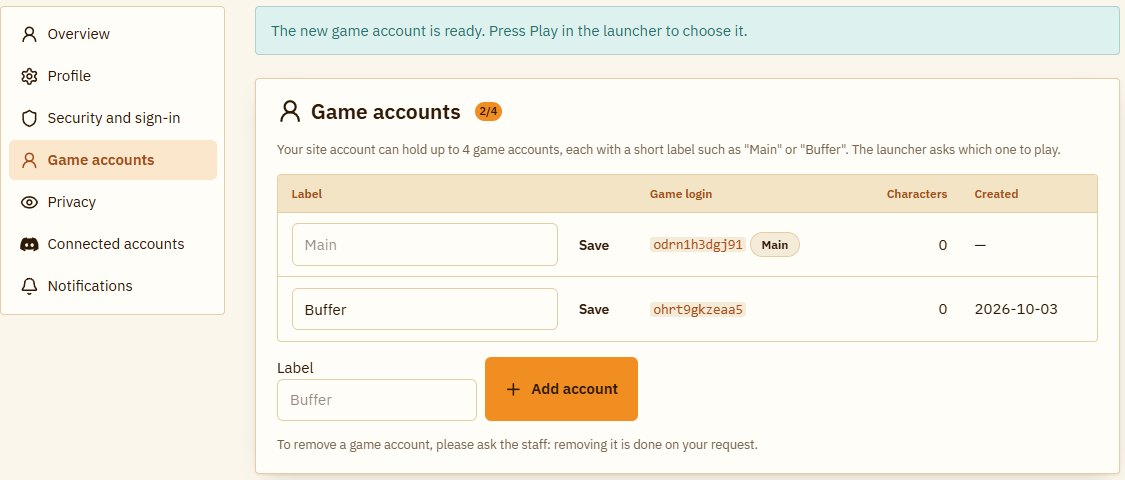
- Sign in on the site and open My account → Game accounts.
- Type a short label (up to 24 characters) and press "Add account".
- The new account shows up in the list at once; you can rename its label any time.
2. Play with one of them
- Start the launcher as usual (it updates itself).
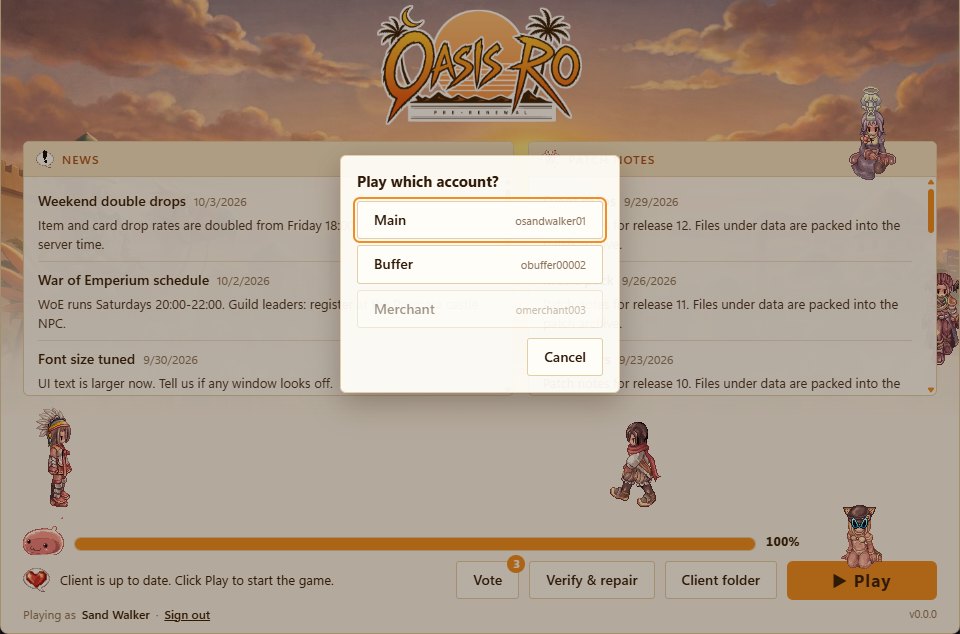
- Press Play: a list of your accounts and their labels appears.
- Pick one and the game opens with it, no password needed.
To play another account at the same time, start the launcher again and pick a second one, up to 4 windows on one PC.
3. Privacy
In My account → Privacy you can hide the characters of all your accounts from the site: rankings, character pages, your forum profile and guild member lists, so nobody links your main to your extras. Guild masters have a switch on the guild page to show the member list to the guild only.

Good to know
- You still sign in to the site with the same email and password; extras play through the launcher only.
- Your main character and guild applications can use characters from any of your accounts.
- You can add up to 3 accounts a day.
- To remove an extra, ask the staff; its characters and storage can be moved to another of your accounts first.