

 Admin
@restock: top up your bag from storage
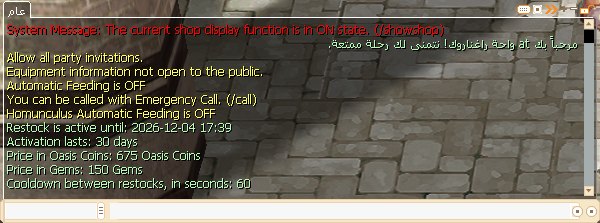
One command brings the potions and gemstones in your bag back to the amounts you saved, moving what's missing from storage, with no storage window and no trip to a Kafra. It works once activated, for 30 days, with Gems or Oasis Coins.
Example: your saved amount of White Potion is 50 and you hold 30, so 20 move from storage.
1. Who can use it
- Every character, with no level or job requirement.
- Activation is per site account: it covers the main account and every extra game account linked to it.
- Each character has its own list; storage is per game account, so the characters of one game account take from the same storage.
2. Activate it
@restock status: shows the expiry, the prices and the cooldown between top-ups.@restock activate gems: activate for 150 Gems.@restock activate coins: activate for 675 Oasis Coins.
Activation lasts 30 days. Earned Gems are spent first, then bought ones.
3. Set up your list
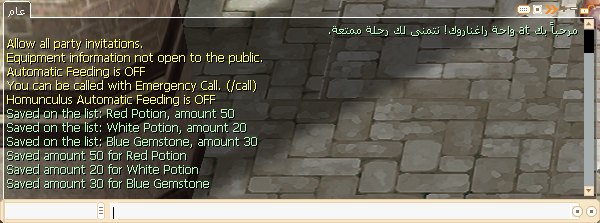
Up to 20 items, from 1 to 300 of each. Name an item by its number, or by its Arabic or English name, whole or by a part no other item shares.
@restock add 504 50: add an item or change its amount (here 50 White Potions).@restock add Blue Gemstone 10: add by name.@restock remove 504: remove an item.@restock list: show the list.@restock reset: clear the list.@restock help: list the commands in chat.
A word like "Blue" matches both Blue Potion and Blue Gemstone, so you're told it matches more than one item; the full name or the number settles it.
Allowed items (16):
- Potions: Red Potion (501), Orange Potion (502), Yellow Potion (503), White Potion (504), Blue Potion (505), Green Potion (506).
- Slim potions: Red Slim Potion (545), Yellow Slim Potion (546), White Slim Potion (547).
- Speed potions: Concentration Potion (645), Awakening Potion (656), Berserk Potion (657).
- Skill materials: Holy Water (523), Yellow Gemstone (715), Red Gemstone (716), Blue Gemstone (717).
Nothing else can be added, ammunition and arrows included. If an item is taken off the allowed list after you saved it, @restock list shows it as "not allowed now" and it isn't moved.
4. Top up
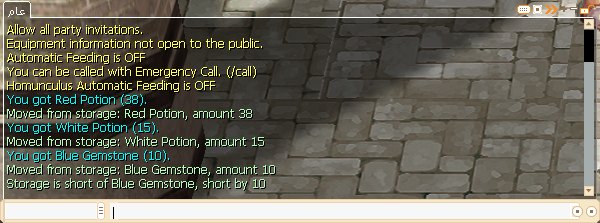
@restock on its own moves what's missing from storage, with one line per item saying how many moved.
- The cooldown between top-ups is 60 seconds, and it doesn't start if nothing moved.
- If your bag is already full up, you're told nothing moved.
- You type it each time; it never runs by itself.
Example: your list is 50 White Potions and 10 Blue Gemstones; you hold 12 White Potions and no gemstones; storage has 100 White Potions and 4 Blue Gemstones. 38 potions and 4 gemstones move, and you're told you're 6 gemstones short.
5. When a top-up falls short
- If storage runs short, what's there moves and the shortfall is shown.
- If weight or bag space runs out, what fits moves and the top-up stops. The rest stays in storage.
- An account-bound item stays bound after it moves.
- Your list isn't cleared when the activation ends: it's kept for the next one.
6. Cost
- 150 Gems or 675 Oasis Coins per 30 days; the top-ups themselves are free.
- Activating before it ends adds 30 days to what's left, so nothing is lost.
Example: 5 days are left and you activate again with Coins: you now have 5 + 30 = 35 days, for 675 Coins.
7. Where it doesn't work
- Castles and War of Emperium maps, PvP maps, battlegrounds, the Clash arena and a few other maps.
- Castle fields during the War of Emperium.
- While dead, during a trade, while vending or at a buying store, or with the storage window open.
- With an NPC dialog open: the command shows as chat and doesn't run, so close the dialog and type it again.
8. Questions
I typed it and nothing happened?
The game won't send the same line more than 3 times in a row: type any other command, then repeat it. An open NPC dialog does the same.
Does it take from guild storage or the account stash?
No, only from your game account's Kafra storage.
Do I activate it on each game account?
No, one activation covers every game account linked to your site account.
Can I add arrows?
No, only the 16 items above.